Simple Editor
Combining tables can be complex, but the simple editor is the fastest, most explainable, and least error-prone editor for this task.
note
You can switch to the advanced editor at any point. However, changes made in the advanced editor cannot be reverted to the simple editor.
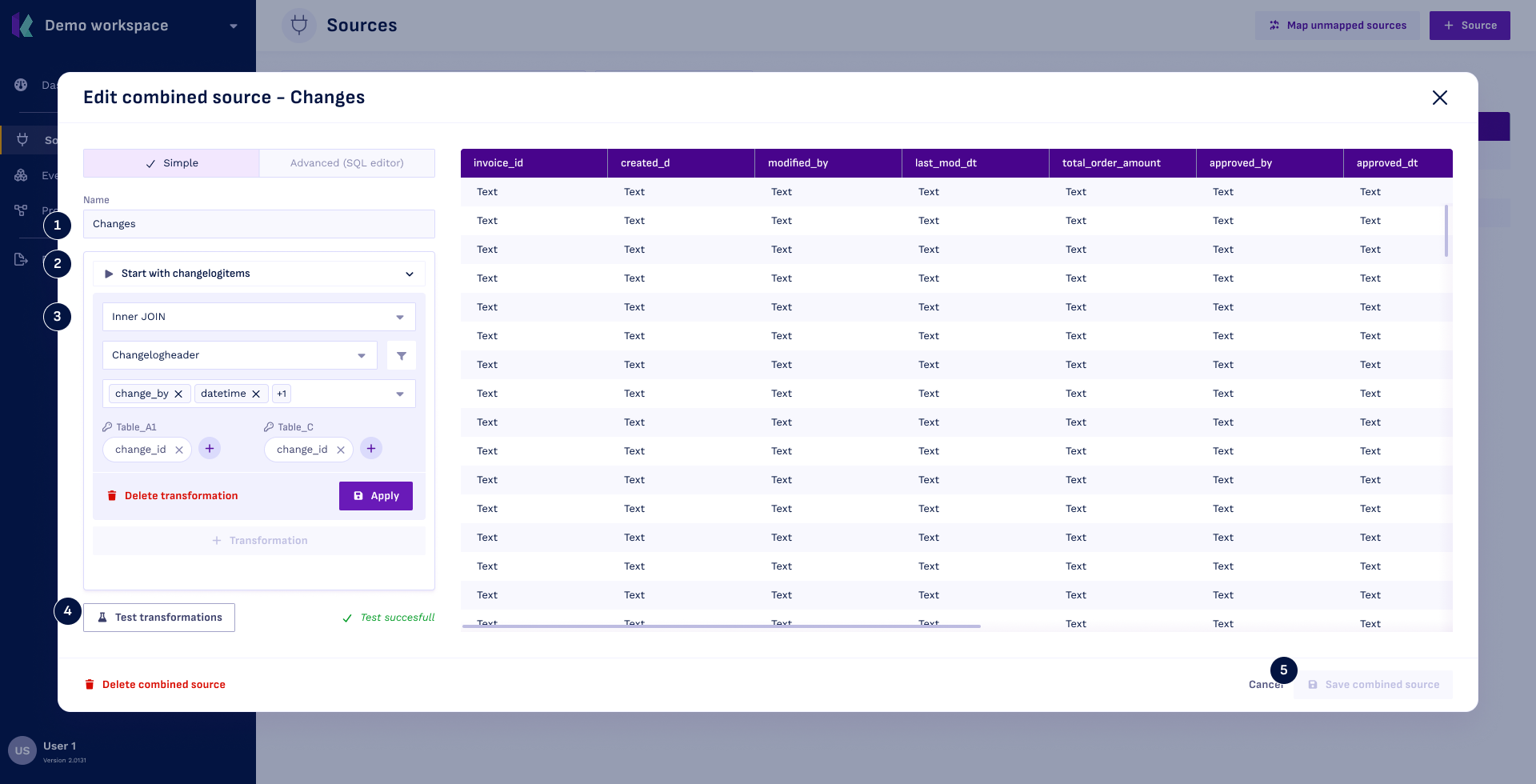
Step 1: Name the Combined Source
- Enter the name that will be displayed throughout Konekti.
Step 2: Select the Starting Table
- Select a table. Optionally, filter the table using the
 filter button.
- Choose the columns to include.
- Click
Save.
Step 3: Add Transformation(s)
- Click
+ Transformation. - Select the transformation type.
- Choose a table. Optionally, filter the table using the filter button.
- Select columns to include.
- (For join only) Specify the join keys to relate the tables, you can also use advanced join keys.
- Click
Apply
Tip: Use the
drag handle to reorder multiple transformations
Step 4: Test Transformations
- Click
Test transformationsto validate.
Step 5: Save Combined Source
- Click
Save combined sourceto finish.