Cloud Deployment on AWS
Introduction
This guide explains how to deploy Konekti on Amazon Web Services (AWS), for both pilot and production use. It includes resource requirements, architectural overview, and instructions for both automated and manual deployment. For a step-by-step deployment guide, contact contact the Konekti support team.
1. AWS Resources Overview
Konekti is deployed using Elastic Container Service (ECS), providing:
- Scalability: Automatically scales with load.
- Serverless Operation: Scales down to zero during inactivity, minimizing cost.
This serverless model is the preferred setup. Alternatively, deployment can be done using EC2 instances if needed.
Required AWS Resources
- ECS Clusters
- One service for the front-end
- One service for the back-end
- RDS PostgreSQL (Aurora preferred)
- Aurora PostgreSQL (serverless) is recommended.
- Traditional PostgreSQL in RDS is also supported.
- Load Balancer
- Routes traffic to front-end or back-end based on path.
- Enables HTTPS via Amazon Certificate Manager.
- Certificate
- Valid TLS certificate created or imported in AWS Certificate Manager.
- VPC
- All resources are deployed within a single Virtual Private Cloud for secure internal communication.
2. AWS Architecture Diagram Overview
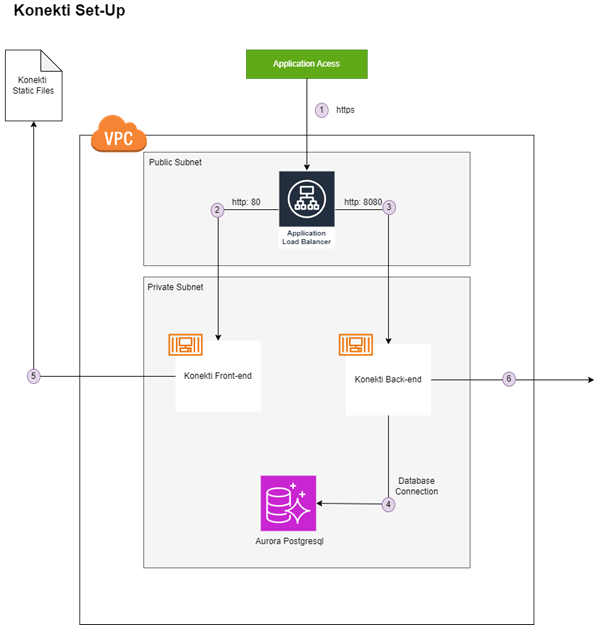
Konekti's AWS architecture is illustrated in Figure 1, with key components and their interactions:
-
Load Balancer
- Entry point via HTTPS (requires valid certificate).
- Access can be restricted by IP or VPN.
-
Routing Logic
- Requests to
/konektior/konektiauth→ routed to back-end (port 8080). - Other requests → routed to front-end (port 80).
- Internal routing uses HTTP within the VPC.
- Requests to
-
Front-End Service
- Serves the static Angular web app.
- Client browser loads app and communicates with back-end via Load Balancer.
-
Back-End Service
- Hosts Konekti API.
- Communicates with Aurora PostgreSQL in private subnet.
-
Aurora PostgreSQL
- Accessible only by back-end service.
- Can be exposed to specific IPs for tools like Celonis, if required.
-
Monitoring & Logging
- Konekti sends metrics to a centralized logging service.
- Requires egress rule for external communication from within the VPC.
All application services (front-end and back-end) and the database run in private subnets, ensuring controlled access via the Load Balancer only.
3. Automated Deployment
Konekti supports Terraform-based automated deployment to AWS. This method provisions all required infrastructure and services consistently. Contact the Konekti team for access to the Terraform configuration.
4. Manual Deployment
Manual deployment is also supported. It involves provisioning AWS services (ECS, RDS, Load Balancer, VPC, Certificate) and configuring container images and routing manually. Follow AWS best practices when performing manual setup.