How Konekti AI works
This page covers what happens when you ask K-AI something, and how to read what comes back.
One assistant, the right approach for each question
You never have to tell K-AI whether you're modeling, analyzing, or debugging, or pick a tool to use. You ask in "plain language", and K-AI works out what kind of help you need and takes it from there. The same assistant supports you across the whole Konekti workflow, from your raw sources through to analyzing a finished process.
Framing: K-AI checks what you mean
Sometimes a question can be read in more than one way. Rather than guessing, K-AI frames it: it shows you the possible interpretations and asks you to pick the one you mean.
Take "Why are my sales low?". "Sales" could refer to several different things, so K-AI presents the possible interpretations, each with a short description, and asks which one you mean.
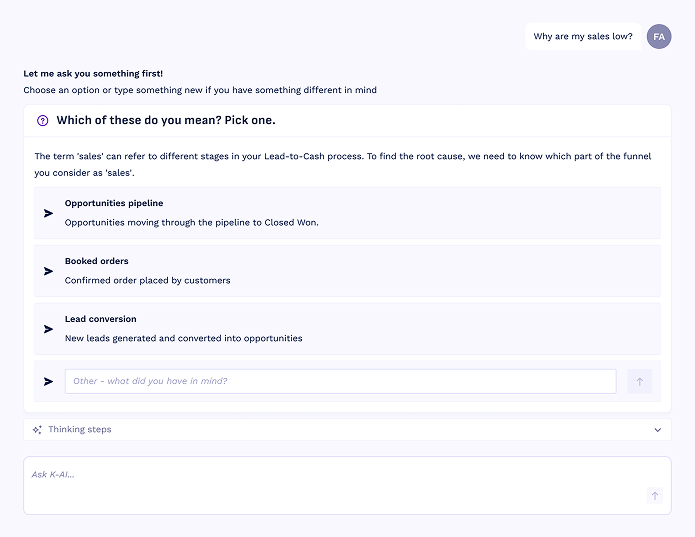
Example of the framing options after asking this question:
- Opportunities pipeline: opportunities progressing through the pipeline toward Closed Won.
- Booked orders: confirmed orders placed by customers.
- Lead conversion: new leads generated and converted into opportunities.
You pick one, or choose Other and type what you actually had in mind. Framing keeps K-AI from running off in the wrong direction and spending a turn on the wrong question. See Getting the best from Konekti AI, to learn more about how you should prompt K-AI
Answers grounded in your data
Every answer K-AI gives is based on your actual workspace data, not on general knowledge or guesswork. When an answer includes a figure or a finding, K-AI shows you where it came from, so you can check it yourself. And when the data needed to answer isn't there, K-AI tells you rather than filling in the gap. For instance by giving you proposals.
Proposals: K-AI checks before it changes anything
Framing keeps you in control of what gets asked. K-AI applies the same principle to what gets changed. It never edits your model on its own, when it wants to make a change: such as adding a missing relation or defining an activity, it shows you a proposal first.
A proposal spells out exactly what K-AI wants to change, and you decide what happens next:
- Edit it if it's close but not quite right.
- Accept it to apply the proposal
- Decline it if you don't want it.
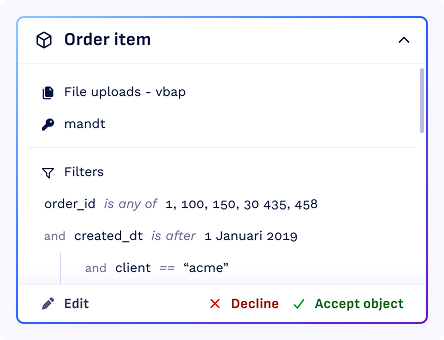
When you accept a proposal, the change is added to your event store as a draft, for instance a newly created object will be ready for you in draft, after accepting the proposal. So you stay in control of what becomes part of your model.
Thinking steps: follow K-AI's reasoning
Alongside its answer, K-AI keeps a record of how it got there with the thinking steps. Open them to see the path K-AI took, step by step.
A single answer can involve several steps. K-AI works out what kind of question you're asking, brings in the right specialist for it, and runs the actions it needs until it has an answer. The thinking steps lay out that whole chain.
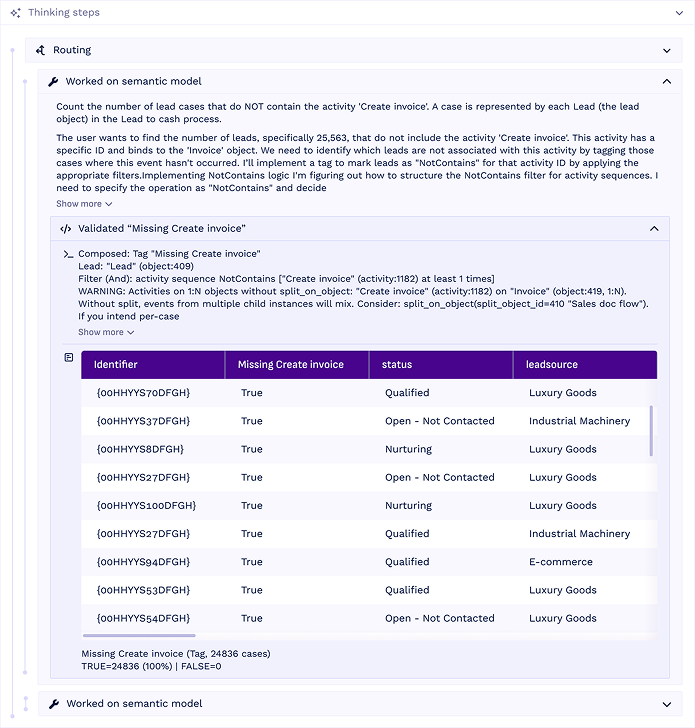
The thinking steps show you:
- The specialists it brought in. For some questions K-AI hands the work to a specialist, for example one focused on modeling and another on analysis. You see each handoff and what that specialist was asked to do.
- The actions it took. Each step is a concrete action, such as exploring a source, looking up your model, running a query against your data, or checking your model's health. Open a step to see exactly what K-AI did, including the query it ran and the results it got back.
- A summary. A quick overview of the work: how many steps K-AI took, how many tools it used, and how long it took.
This is what makes K-AI's answers checkable. When an answer cites a figure, you can follow it straight back to the step and the data that produced it. And if an answer ever looks off, the thinking steps are the first place to look: often you'll spot that your question was read differently than you intended, which you can fix by asking again more precisely.
It remembers your conversation
Within a conversation, K-AI remembers what you have already discussed, so you can build on an earlier answer with a follow-up like "now break that down by region" without repeating yourself. When you move on to an unrelated topic, start a new conversation so K-AI works from a clean slate.
How it fits together
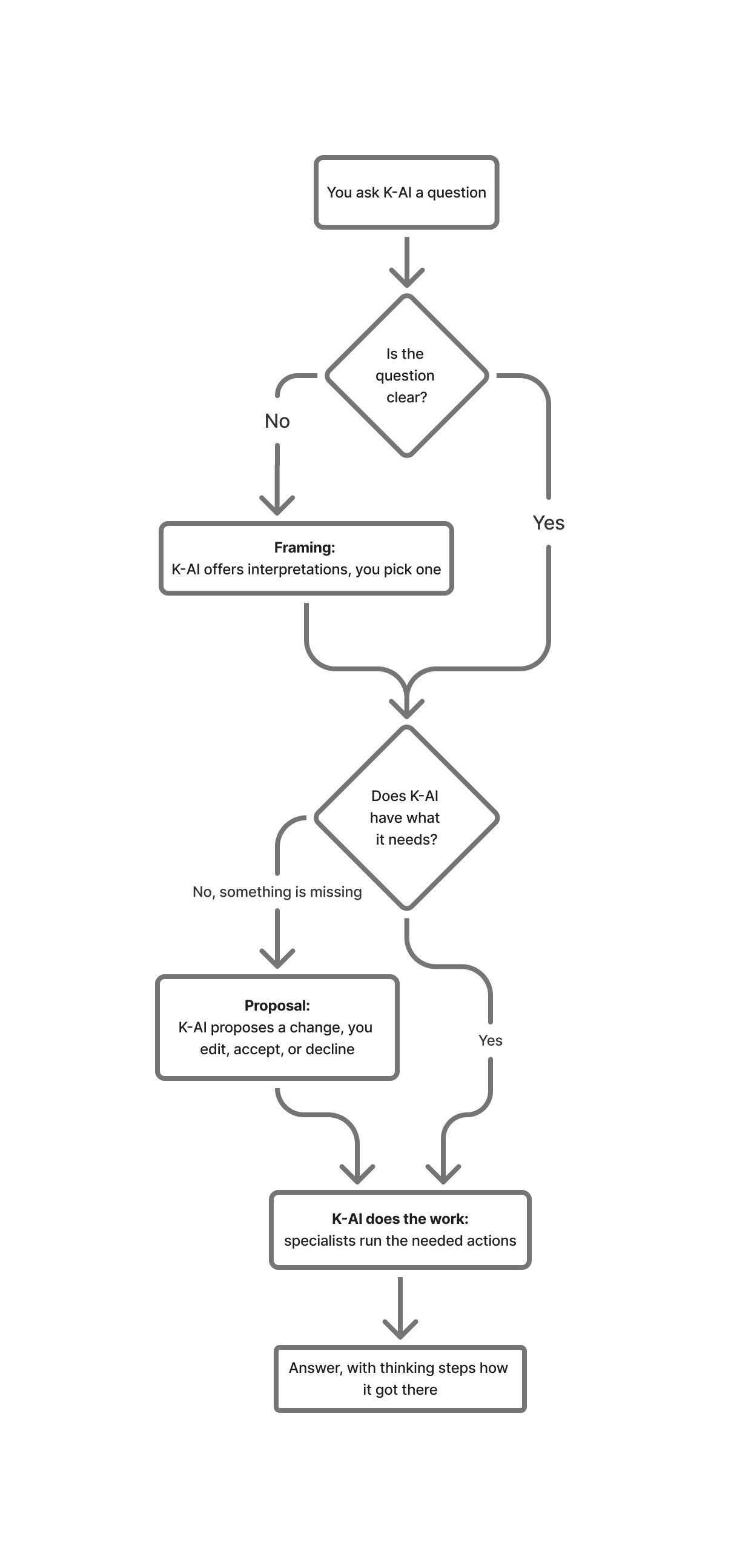
Now that you've seen each part, here's the whole flow in one view: a question may pass through Framing or a Proposal before K-AI does the work and returns a grounded answer.
Click next to learn more about why your prompts matter.